Edit PDFs without uploading them
Without an account, your PDF never reaches our servers.
Drop a PDF hereOpen a PDF to editOpen your PDFDrop to open
- Nothing is uploaded unless you save it to an account.
- We keep no copy of your file: close the tab and it’s gone.
- Nothing to sign up for or install. How?
See it in 50 seconds
One rental agreement, edited start to finish without uploading it.
A rental agreement edited start to finish without uploading it: a line retyped in its own font with the Wi-Fi off, a logo added, a highlight, a comment and a stamp, a signature, two versions compared, names blacked out, a translation, flashcards (with a free account), and merge, compress and protect.
What you can do
Everything you need to do with a PDF
Start with any of them. Of these, only flashcards need a free account.
Edit existing text
Click into the page’s own words and type. New letters are set in the line’s font and size, and a paragraph re-wraps between its margins. When a line can’t be rewritten, the editor says why, and you can cover and retype it instead.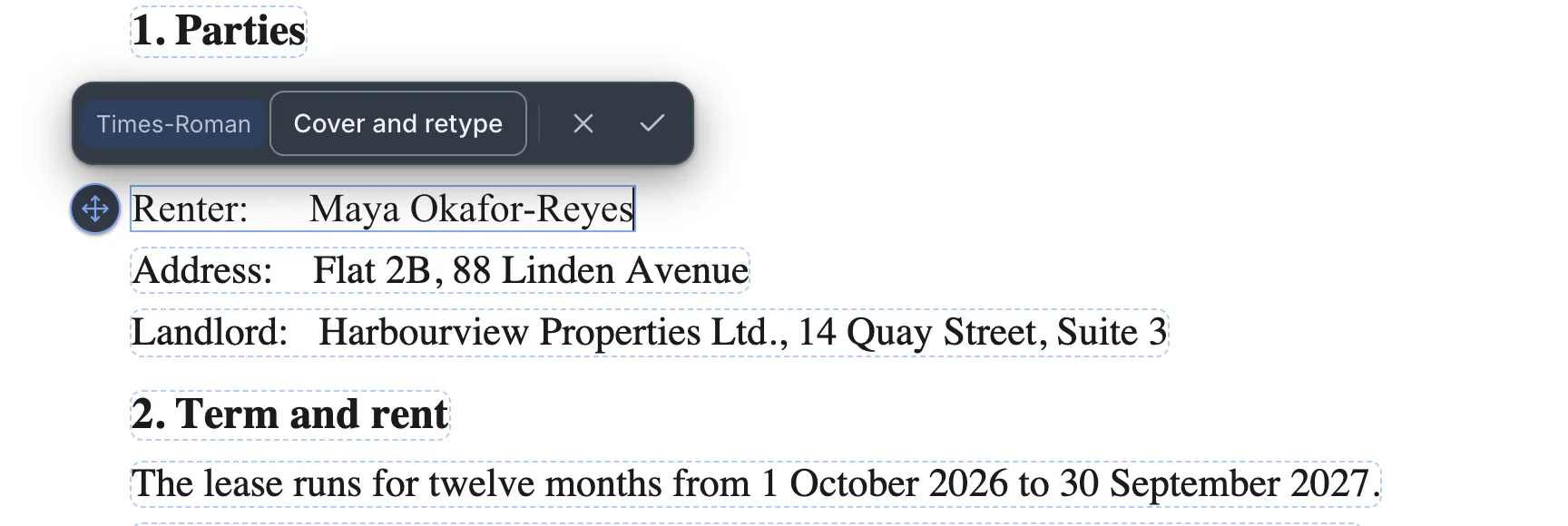
- On your device
Translate and keep the layout
Each paragraph is rewritten where it stands, into English, French, German, Spanish and nine more, keeping the layout. It uses the page’s own font where that has the letters, and otherwise the nearest font the app carries. Hear it read aloud
A natural English voice that downloads once and runs on your device, or in your browser’s own voices. Each sentence is marked on the page as it is read.Redact for real
The text under a redaction is deleted from that page of the file, not just covered, and checked again before you download.- Free account
Study with flashcards
Make a card from what you select, review it when it’s due, and take the deck to Anki or onto paper.

How it works
Open a PDF
Drop it on the page or choose it. No account, and no upload.
Make your changes
Retype a line, translate the text, redact a name, or fill in a form and sign it.
Download
You get an ordinary PDF that opens anywhere. It’s the only copy, so keep it.
Privacy
Where your file goes
Nowhere, unless you choose to keep it in an account. The editor runs in your browser, so the PDF you open is read right there.
- Opened in your browser
- Never uploaded without an account
- Gone when you close the tab, unless you keep it in an account
- Opening, editing, translating, OCR and saving all run in this browser tab.
- OCR, translation and the natural voice may download their own files from our server the first time. Your pages stay here.
- No copy of your document stays with us. We keep crash reports, without its words, and problem reports you send.
- Analytics only if you allow it, never the PDF or its words. Our server counts page views with no cookie or ID.
- With a free account, the files you keep in your library are stored with Cloudflare, so they reach your other devices.
Beyond editing
Turn a PDF into something you can learn from
Make flashcards as you read and review them when they are due, or read faster, one word at a time.
Flashcards
Needs a free accountChlorophyll reflects green light.
FrontWhat does chlorophyll reflect?
Backgreen light
Go to sourceA card from what you select
Select a passage or a highlight and make it a card. The card links back to where it came from.
Chlorophyll reflects […] light.
A = πr2Blanks, pictures and formulas
Tap words to blank them out, hide the labels on a snapshot of a figure, or write math between dollar signs.
What does chlorophyll reflect?
green light
AgainHardGoodEasyReview when a card is due
Answer Again, Hard, Good or Easy, and each card comes back on its own schedule.
- Anki
- Print, front and back
- Images
- One web page
Take the deck anywhere
Export to Anki, print fronts and backs on facing sheets, save each card as an image, or save one web page that works offline.
Cards are kept with the file in your library, so the guest editor doesn’t offer them. Create a free account
Read faster
No account neededEverything else
And the rest of the PDF work
Mark up, merge, split, sign, compress, write Markdown and more. Every tool shown here works in your browser, without an account.
- Annotate PDFHighlight, comment and draw, measure a plan, stamp and sign. Saved as standard PDF annotations.
- Merge PDFsJoin several PDFs into one file, in the order you set, with a bookmark for each.
- Split a PDFBreak one PDF into several files: by page count, at pages you mark, by bookmark or size.
- Compress PDFMake the file smaller for email by scaling pictures down to print sharpness.
- PDF to WordTurn the document’s text into a Word file you can edit.
- Sign PDFDraw or type your signature and place it on the page.
- OCR PDFMake an English scan’s words searchable and copyable, with each page looking as it did.
- Organize PDFDrag the pages into the order you want, and turn or delete any along the way.
- Markdown editorWrite Markdown with a live preview, then download it as a .md file or a PDF.
- Markdown to PDFTurn a Markdown file or pasted text into a PDF, with its tables and links.
- Delete pagesTake out the pages you don’t need: tick them in the page grid and delete them in one go.
- Extract pagesCopy chosen pages into a new PDF of their own: tick them, or type a range like 1-3, 7.
What a free account adds
- A library of your PDFs, kept for you.
- The same files on every device you sign in on, with your changes synced.
- Version history for each file, and review rounds for comments.
- Your library inside the tools: merge or edit the PDFs you keep, and save what a tool makes.
Free, with usage limits. Work you do as a guest isn’t moved into an account.
Questions
Something else? Use Report a problem in the app.
Is my PDF uploaded?
Not without an account. The file is opened and edited in your browser tab and never sent to us. Files you add to a library, with an account, are stored on our servers so they reach your other devices.
What do you keep?
As a guest, we keep no copy of your file: when the tab closes, the file and your work are gone, so download your PDF when you’re done. We do keep crash reports, which never include the file or its words, and any problem report you choose to send. Our privacy page lists everything we keep.
Do I need an account?
No, to open, edit and download a PDF. An account adds a library, your files on every device, version history, and the tools that start from the library, such as merging files you keep in your library.
Can it edit any PDF?
Most PDFs made from text. A letter or digit the PDF’s copy of the font lacks is set in a close match of that font, and the editor names it before you save. Text the file won’t let us rewrite, such as text in a form field, is named on the page when you start editing, and a letter no close match covers, such as Chinese typed into an English line, is flagged as soon as you type it. Either way, you can cover the line with a box and retype it in the nearest standard font; the old words stay in the file underneath.
What about scanned pages?
A scan is a picture of words. The text recognition tool (OCR) makes its words searchable and copyable, but a scanned line can’t be retyped in its own font.
Does it work on my phone?
Yes. Open a PDF from your phone’s browser, retype a line, fill in a form, sign it and download it. The buttons are big enough for a thumb, and there’s nothing to install. It works in current versions of Chrome, Edge, Firefox and Safari, on a phone, a tablet or a computer.
Can I turn Markdown into a PDF?
Yes. Markdown to PDF makes a .md file or pasted text into a PDF in your browser tab, with its headings, tables, code and links. To write it first, the Markdown editor shows a live preview as you type.
Is it free? Are there limits?
Yes, it’s free. As a guest there’s no file-size or usage quota, because the file never reaches our server, though some tools work in runs of up to a set number of pages. The account is free too. Limits lists them all.